Temporary Chat vs Regular Chat: What Actually Changes in ChatGPT?
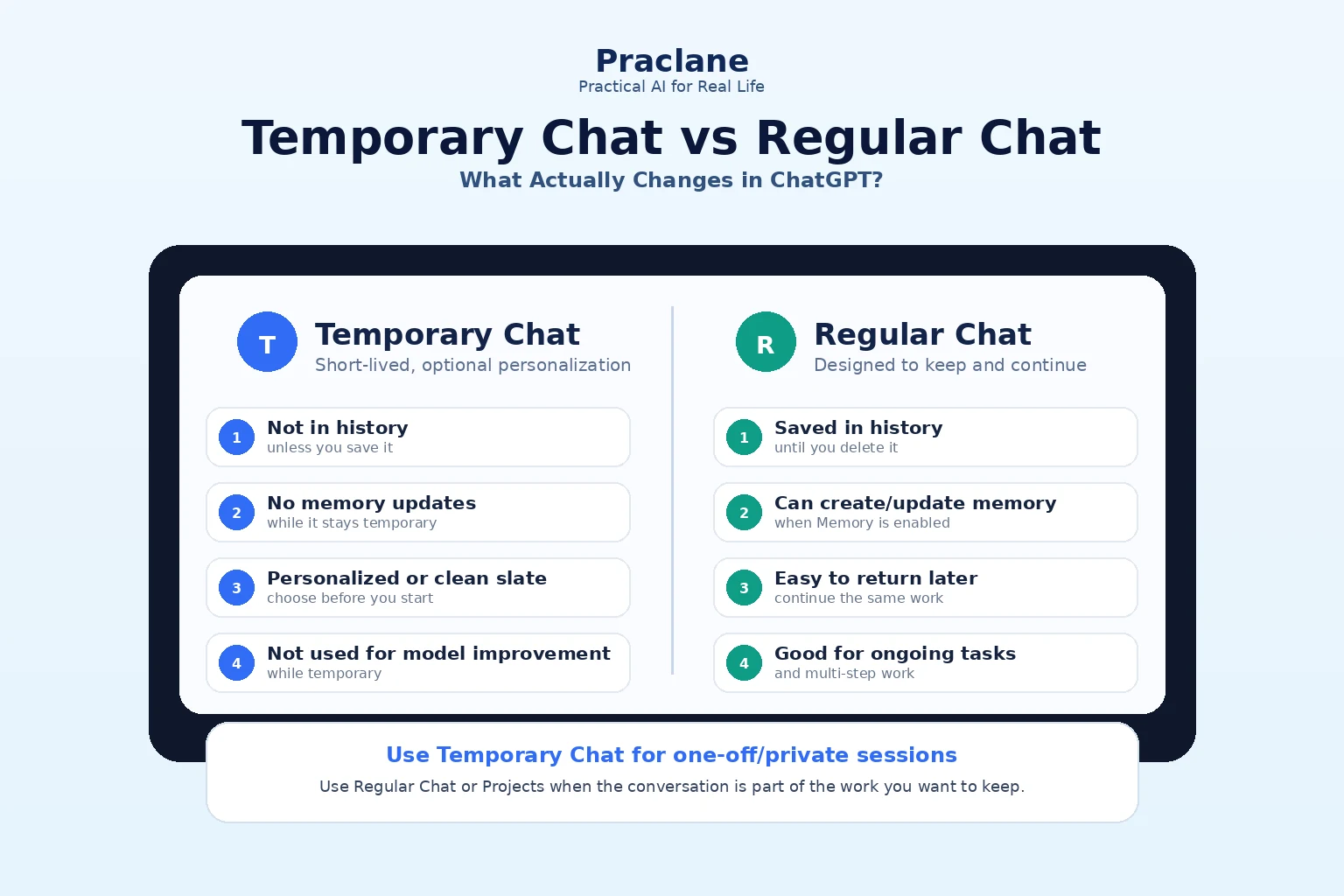
Temporary Chat looks like a small privacy toggle, but it changes several important parts of how a conversation behaves. The biggest differences are not about the model itself—they are about history, personalization, memory, model improvement, file retention, and whether you can return to the conversation later.
This guide compares Temporary Chat vs regular ChatGPT chats using practical scenarios. It also explains a detail many people miss: a temporary conversation can now be either Personalized or Unpersonalized before you start.
Temporary Chat vs Regular Chat: Quick Comparison
OpenAI’s current Temporary Chat documentation says a temporary chat stays out of your chat history unless you choose to save it. While it remains temporary, it is not used to improve OpenAI models. OpenAI may still retain a copy for up to 30 days for safety purposes.
| Area | Temporary Chat | Regular Chat |
|---|---|---|
| Chat history | Not shown unless you later save it | Saved until you delete it or a workspace policy removes it |
| Return later | Only if you save it as a regular chat | Yes |
| Existing memory | Optional: Personalized can use it; Unpersonalized does not | Follows your account settings |
| Create/update memory | No while temporary | Can, when Memory is enabled |
| Custom Instructions | Used in Personalized mode; ignored in Unpersonalized mode | Follows account settings |
| Plugins | Can be used in Personalized mode | Available according to account and workspace settings |
| Model improvement | Not used while temporary | Follows your data-control setting and workspace policy |
The Most Important Change: Personalized vs Unpersonalized Temporary Chat
A common assumption is that Temporary Chat always starts from a completely blank slate. That is no longer necessarily true.
- Personalized Temporary Chat can use existing memories, Custom Instructions, and plugins where available.
- Unpersonalized Temporary Chat does not use memory, Custom Instructions, or plugins.
Both versions remain temporary: they do not create or update memory while the conversation stays temporary, and they stay out of history unless you explicitly save them.
If you want a deeper explanation of how memory itself works, see our ChatGPT Memory in 2026 guide.
7 Real Scenarios: Which Chat Should You Use?
1. You Want a One-Off Conversation You Do Not Need Later
Use Temporary Chat. This is the clearest fit when the value of the conversation ends after the current session—for example, rewriting a short message, brainstorming a surprise gift, or asking a personal question you do not want cluttering your history.
Help me rewrite this message so it sounds calm and clear. I only need this conversation once and do not want to keep it in my chat history.
2. You Want a Truly Clean Personalization Test
Use Unpersonalized Temporary Chat. This is useful when you want to see how ChatGPT responds without existing memory, Custom Instructions, or plugins influencing the answer.
It is a useful troubleshooting method when you suspect personalization is changing the output. Ask the same question in your normal chat and in an unpersonalized temporary chat, then compare the difference.
3. You Want Privacy but Still Want Your Normal Preferences
Use Personalized Temporary Chat. This is the middle ground: the conversation can benefit from preferences ChatGPT already knows, but the temporary conversation does not create or update memory and does not stay in history unless you save it.
4. You Are Building Something Over Several Days
Use a regular chat or a Project. Temporary Chat is a poor fit when the conversation itself is part of the work product. If you expect to return tomorrow, compare versions, add files, or continue the same thread, keeping the chat is usually more useful.
For larger ongoing work, our Projects vs regular chats comparison explains when a Project is worth using.
5. You Are Uploading a File You May Reuse Later
Think carefully before choosing Temporary Chat. OpenAI’s current Library documentation says files uploaded in a temporary chat are not saved to Library while the chat remains temporary. If you later save the chat to history, eligible files may also become available in Library, subject to availability and storage limits.
6. You Are Using a GPT or Action That Sends Data to Another Service
Temporary Chat does not cancel third-party data handling. OpenAI notes that if a GPT uses actions, data sent to another service is governed by that service’s privacy policy. The third party may retain the information longer than ChatGPT’s temporary-chat retention period.
So “temporary” describes how ChatGPT handles the conversation—not necessarily what every external service does with data you send through an action.
7. You Are Unsure Whether You Will Need the Conversation Later
You can start temporary and save the chat later. Once saved, it becomes a regular chat and follows the retention and model-improvement rules that apply to saved chats.
A Controlled Comparison: Same Prompt, Different Context
Imagine you normally use ChatGPT with Custom Instructions that say: “Give concise answers, use tables when useful, and focus on practical steps.” Your memory also contains context about the kinds of work you do.
Help me plan the next three priorities for this week.
| Mode | Likely Difference in Context |
|---|---|
| Regular Chat | Can use current conversation context, account personalization, and create/update memory where enabled |
| Personalized Temporary | Can use existing personalization, but does not create/update memory and stays out of history unless saved |
| Unpersonalized Temporary | Starts without memory, Custom Instructions, or plugins |
This makes Unpersonalized Temporary Chat a useful diagnostic tool. If the answer changes dramatically, you have evidence that personalization—not just the prompt—was shaping the response.
What Happens to Temporary Chats and Files?
OpenAI’s current retention documentation says temporary chats do not appear in history unless saved. OpenAI may retain a copy for up to 30 days for safety purposes.
- If you save the temporary chat, it becomes a normal chat.
- If you upload files while the chat stays temporary, those files are not saved to Library during the temporary session.
- If the temporary chat uses a third-party action, the recipient’s retention policy can be different.
Temporary Chat Is Not the Same as “No Data Exists Anywhere”
This distinction matters. Temporary Chat is a product mode with specific history, memory, training, and retention behavior. It should not be interpreted as a guarantee that no system, safety process, plugin, or external service handles any data at all.
For genuinely sensitive information, minimize what you share, check your organization’s rules, and review the privacy policy of any connected third-party service.
When Regular Chat Is Better
- You want to return to the conversation later.
- You want the conversation to become part of your working history.
- You want Memory to learn or update relevant information, where enabled.
- You are building a multi-step workflow across several sessions.
- You want uploaded files to remain easy to find and reuse through Library.
FAQ
Does Temporary Chat use memory?
It can use existing memories if you choose Personalized before the conversation begins. Unpersonalized Temporary Chat does not use memory, Custom Instructions, or plugins. Temporary Chat does not create or update memories while it remains temporary.
Is Temporary Chat completely deleted immediately?
No. OpenAI says a copy may be retained for up to 30 days for safety purposes.
Can I save a Temporary Chat later?
Yes. Saving it converts it into a regular chat, after which normal saved-chat rules apply.
Are files from Temporary Chat saved in Library?
Not while the conversation remains temporary. If you later save the chat, eligible files may also become available in Library, depending on current feature availability and storage rules.
Final Thoughts
Use Temporary Chat when the conversation should be short-lived. Use Unpersonalized when you want a clean slate, and Personalized when you still want existing preferences without adding the session to your normal history or memory.
Use regular chats or Projects when the conversation itself is part of the work you want to keep.