ChatGPT Project vs Chat: What’s the Difference? 5 Real Scenarios
A regular ChatGPT conversation can handle an enormous number of tasks. So why create a Project at all?
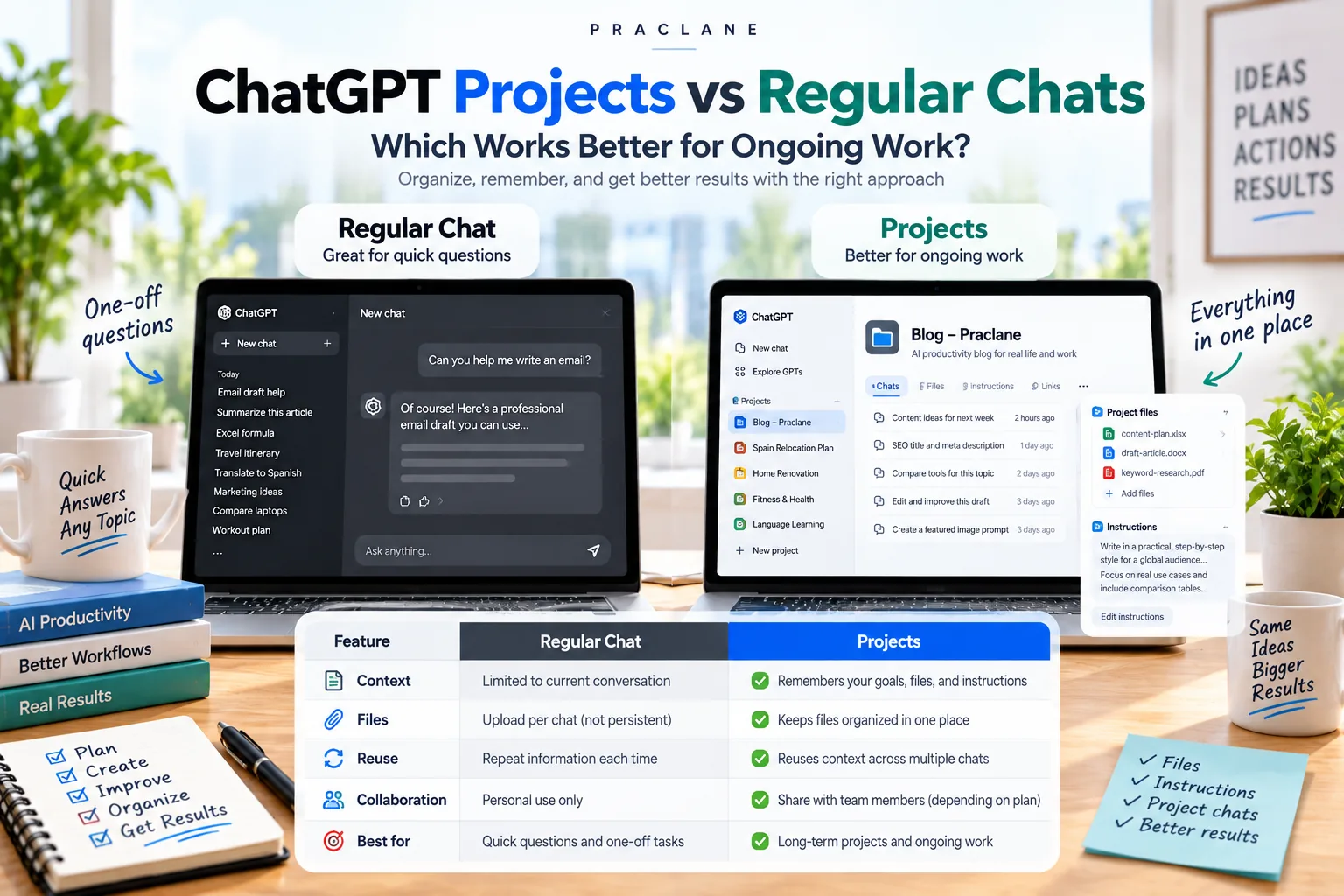
The difference becomes clear when work lasts longer than one conversation. A regular chat is ideal for a self-contained question. A ChatGPT Project is designed to keep related chats, files, instructions, and project context together so you can return to the same body of work without rebuilding the setup every time.
This article compares ChatGPT Projects vs regular chats through realistic work scenarios rather than a feature checklist alone.
What’s the Difference Between a ChatGPT Project and a Regular Chat?
A regular ChatGPT chat is best for one self-contained conversation. A ChatGPT Project is better when several chats, files, instructions, and recurring context belong to the same ongoing goal. Projects add organization and reusable context; they do not automatically give you a better model.
A simple rule: if the answer matters once, use a chat; if the context matters again, use a Project.
The Short Version
| Use a Regular Chat When… | Use a Project When… |
|---|---|
| The task is quick and self-contained | You expect to return to the work repeatedly |
| You need one answer or one draft | Several chats belong to the same goal |
| You do not need persistent project files | Files and instructions should stay organized together |
| Background context is simple | Context grows over days or weeks |
| You want maximum separation from other work | You want a dedicated workspace for one topic |
OpenAI’s current Projects documentation describes Projects as dedicated spaces that can hold related chats, files, instructions, and context. OpenAI’s Academy also recommends regular chats for quick, self-contained tasks and Projects when you expect to return to the same work over time.
What a Project Adds That a Normal Chat Does Not
1. A Shared Container for Related Chats
In a regular chat, the current conversation is the main container. A Project groups multiple conversations under one project so different tasks can stay connected to the same body of work.
2. Project Files
Files can stay attached to the Project instead of being uploaded again every time you start a new project-related conversation.
3. Project Instructions
You can keep instructions for tone, output format, process, or working rules at the Project level. That is useful when you repeatedly create similar outputs.
4. Project Memory Options
Projects can use normal memory behavior or project-only memory where available. With project-only memory, chats can reference other conversations inside the same Project but not conversations outside it, and conversations outside the Project cannot reference Project chats.
One important limitation: OpenAI currently notes that ChatGPT Work is not available inside Projects using project-only memory.
Scenario Comparison: Five Common Tasks
Scenario 1: Write One Difficult Email
Better fit: Regular chat.
If you need one reply to one email, creating a Project adds unnecessary structure. Paste the context, ask for the draft, revise it, and move on.
For reusable email structures, see our ChatGPT email prompts.
Scenario 2: Write a Weekly Status Report for Three Months
Better fit: Project.
This is where Projects become valuable. Keep the reporting rules, prior reports, source files, and project conversations together. Each week can have its own chat without losing the larger context.
Pair this with our recurring reports workflow.
Scenario 3: Research a Topic With 12 Source Files
Better fit: Project.
A regular chat can analyze uploaded files, but a Project is easier when the research evolves. You can keep files, separate conversations for different questions, and project-level instructions such as “cite the source file after every factual claim.”
Scenario 4: Ask a Quick Excel Formula Question
Better fit: Regular chat.
If the task is “Why does this formula return #VALUE?” a Project is usually unnecessary. Use a regular chat unless the spreadsheet belongs to a larger recurring workflow.
For spreadsheet workflows, see our ChatGPT for Excel guide.
Scenario 5: Run an Ongoing Content Operation
Better fit: Project.
If you repeatedly research keywords, draft articles, reuse editorial rules, maintain internal-link conventions, and refer to the same site strategy, a Project reduces repeated setup. The Project can hold the content plan, editorial rules, examples, and related conversations.
A Seven-Day Example: Product Launch
Imagine you are using ChatGPT for a product launch over one week.
| Day | Regular Chat Approach | Project Approach |
|---|---|---|
| Monday | Explain the launch and upload brief | Add brief and project instructions once |
| Tuesday | Continue same chat or restate background | Start a new competitor-analysis chat in the same Project |
| Wednesday | Upload revised document again if needed | Keep revised source in project files |
| Thursday | Search old chat for decisions | Ask a new project chat to use related project context |
| Friday | Manually collect outputs from several chats | Create a wrap-up chat inside the same Project |
The Project does not make every answer automatically better. Its advantage is organizational: it keeps context and artifacts around the same goal easier to reuse.
Where Regular Chats Still Win
- Speed: no setup is required.
- Separation: a one-off topic stays isolated rather than becoming part of a larger workspace.
- Disposable tasks: many questions do not deserve a permanent project.
- Experimentation: quick brainstorming can be easier outside a structured project.
Where Projects Win
- Continuity: the work continues across several conversations.
- Files: the same reference material matters repeatedly.
- Instructions: the same rules should apply every time.
- Team collaboration: supported shared Projects let multiple people use the same project context.
- Organization: related conversations stay under one goal instead of spreading through the chat history.
Project-Only Memory: When It Matters
Project-only memory is useful when you want strong context boundaries. A client Project, for example, can be configured so its conversations reference that Project rather than unrelated conversations elsewhere in ChatGPT.
This is useful for separation, but it is not a security shortcut. Workspace permissions, account settings, file permissions, and organizational policies still apply.
A Simple Rule of Thumb
If the answer matters once, use a chat. If the context matters again, consider a Project.
That rule is not perfect, but it avoids creating Projects for trivial tasks while still capturing the main reason the feature exists.
FAQ
What is the difference between a ChatGPT Project and a chat?
A chat is one conversation. A Project is a workspace that can group multiple related chats, files, and project instructions, with project memory behavior that can reuse context across conversations inside the Project depending on your settings.
Do Projects give ChatGPT a better model?
No. The main advantage is project organization and context, not automatically switching you to a smarter model.
Can a Project remember other chats in the same Project?
Yes, depending on your memory settings and account. OpenAI documents project memory behavior that can use chats and files from the same Project as context.
Can I move an existing chat into a Project?
OpenAI currently allows eligible existing chats to be moved into Projects. Some chats, such as conversations created with a GPT, may not be movable.
Should every long chat become a Project?
No. A long conversation can still be perfectly usable. Create a Project when you want an organized workspace for multiple chats, files, instructions, and ongoing context.
Final Thoughts
Projects are not a replacement for regular chats. They are a different level of organization.
Use regular chats for fast, self-contained work. Use Projects when the same goal, files, instructions, and context will matter again tomorrow, next week, or next month.